Evaluating the Flame SVG Bundle for Creative Projects
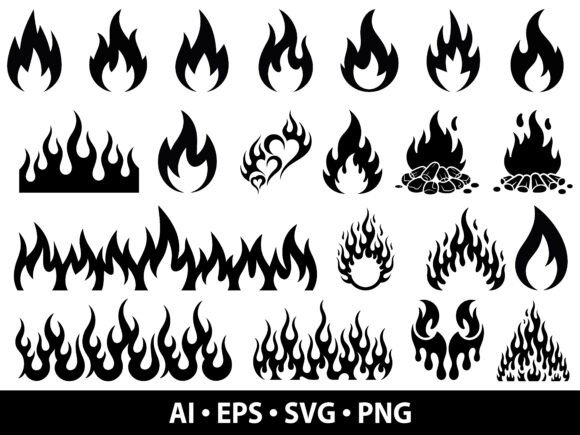
The digital design landscape offers a vast array of resources for creators, ranging from automotive enthusiasts to professional graphic designers. Among these resources, the Flame SVG Bundle stands out as a collection specifically curated for projects requiring fire imagery. This bundle provides a comprehensive set of vector files featuring various fire flames, burning effects, campfire designs, decorative fire elements, and flame silhouettes. For individuals researching design assets, understanding the scope, utility, and limitations of this specific bundle is essential before integrating it into a workflow.
Understanding the Composition of the Bundle
At its core, the Flame SVG Bundle is a digital asset pack designed to streamline the creation process for projects involving fire motifs. Unlike raster images that lose quality when resized, this collection relies on Scalable Vector Graphics (SVG) technology. The bundle includes multiple file formats to ensure compatibility across different software ecosystems. Users typically receive files in SVG, PNG, EPS, and AI formats. Additionally, the inclusion of high-resolution PNGs with transparent backgrounds at 300 DPI ensures that non-vector workflows remain viable for print-on-demand services or quick mockups.
The variety within the collection is a primary feature. It does not offer a single static image but rather a spectrum of styles. These range from realistic burning effects suitable for dramatic impact to stylized campfire designs ideal for outdoor themes. There are also clean flame silhouettes that function well as minimalist icons or bold logos. This diversity allows a single purchase to cover multiple aesthetic requirements, reducing the need to source disparate elements from different vendors.
Identifying Suitable Use Cases
Determining whether the Flame SVG Bundle aligns with your goals requires analyzing the intended application. The versatility of the included designs makes them a strong fit for several specific industries and hobbyist categories.
- Automotive and Racing: The dynamic nature of flame silhouettes and racing graphics makes them ideal for vehicle decals. Whether customizing a car hood, creating window stickers, or designing team apparel, the scalable nature of the vectors ensures crisp lines even on large surfaces.
- Firefighter and Emergency Services: Organizations and individuals supporting firefighters often seek dignified yet powerful imagery. The bundle's specific firefighter designs provide appropriate motifs for commemorative patches, memorial shirts, or departmental logos without the need for complex illustration work.
- Camping and Outdoor Gear: Campfire designs and rustic fire elements are highly relevant for branding outdoor equipment, organizing camping events, or creating scrapbooking layouts for travel journals.
- Apparel and Merchandise: For those utilizing sublimation printing or heat transfer vinyl (HTV), the clean lines of the bundle facilitate easy weeding and cutting. This is particularly useful for producing t-shirts, hoodies, and hats where detail retention is critical.
Beyond these specific niches, the bundle serves general crafters using machines like Cricut, Silhouette Cameo, Glowforge, and laser cutters. The ability to cut intricate flame shapes from wood, acrylic, or vinyl expands the physical applications of these digital files.
Benefits and Technical Advantages
The primary advantage of selecting a vector-based bundle over individual raster images lies in scalability. Because the designs are mathematical constructs rather than pixel grids, they can be resized infinitely without degradation. A logo created for a small sticker can be expanded to a billboard-sized decal while maintaining sharp edges. This scalability is crucial for businesses that require consistent branding across various product sizes.
Furthermore, the multi-format delivery system reduces friction in the production pipeline. Designers working in Adobe Illustrator can utilize the AI and EPS files for further editing, such as changing colors or combining elements. Conversely, users who rely on consumer-grade cutting machines can import the SVG files directly into Cricut Design Space or Silhouette Studio. The inclusion of high-resolution PNGs offers a fallback option for users who do not have access to vector-editing software but still require a transparent background for web use or simple print jobs.
Tradeoffs and Considerations
While the Flame SVG Bundle offers significant convenience, there are tradeoffs to consider. The most notable limitation is the inherent lack of originality. Since these are pre-made assets available to anyone who purchases the bundle, the resulting designs may appear generic if used without modification. In competitive markets like print-on-demand, where uniqueness drives sales, relying solely on unaltered bundle assets can lead to market saturation.
Additionally, the complexity of certain flame designs may present challenges for specific cutting methods. Intricate, wispy flame details might be difficult to weed from HTV or could burn unevenly during laser cutting depending on the material thickness. Users must evaluate the intricacy of each design against the capabilities of their specific hardware. What works perfectly for a screen print might fail when attempting to cut thin vinyl.
Cost is another factor. While purchasing a bundle is generally more economical than buying individual designs, it represents an upfront investment. If a project only requires a single, specific type of flame, sourcing one custom illustration might be more cost-effective than acquiring a full suite of unused assets.
When to Consider Alternatives
There are scenarios where the Flame SVG Bundle may not be the optimal choice. If a brand requires a unique, trademarkable logo that distinguishes it entirely from competitors, hiring a freelance illustrator to create a bespoke flame icon is a superior strategy. Custom illustrations allow for the integration of specific brand colors, symbolic nuances, and stylistic choices that pre-made bundles cannot accommodate.
Similarly, for projects requiring photorealistic fire effects—such as a movie poster or a high-end magazine cover—the stylized nature of vector flames may fall short. In these instances, stock photography or advanced digital painting techniques would yield a more authentic result. Furthermore, if the user lacks the necessary software to edit vector files, the potential for customization is limited to the provided variations, which might restrict creative expression.
Decision-Making Insights
To determine if the Flame SVG Bundle is the right tool for your needs, assess your project timeline, budget, and desired level of uniqueness. If you require a rapid turnaround for a personal project, a small business launch, or a seasonal event, the efficiency of this bundle is unmatched. The ability to download, scale, and cut immediately saves hours of design time.
However, if the goal is to establish a distinct corporate identity or produce a high-volume commercial product where differentiation is key, treat the bundle as a starting point rather than a final solution. Plan to modify the vectors significantly—altering paths, combining elements, or adjusting color palettes—to ensure the final output reflects a unique vision.
Ultimately, the value of the Flame SVG Bundle lies in its flexibility. It bridges the gap between amateur crafting and professional design by providing high-quality, versatile assets. By understanding both its capabilities and its limitations, creators can make informed decisions about how best to integrate these fire-themed elements into their broader creative strategies.